Our registration process gives Canadian players access to the account area for deposits, bonuses, profile security and verification. Before creating a profile, visitors can review the site structure, rules, current bonus offers and selected demo games.
Canadian players start the Charmius Casino sign up process when they are ready to move past browsing and use the platform in full. We ask for accurate personal details from the start because real-money play, account protection, bonus use and later verification all depend on the registered player profile.
How to Create a Charmius Casino Account
Canadian players start the Charmius Casino sign up process when they are ready to move past browsing and use the platform in full. We ask for accurate personal details from the start because real-money play, account protection, bonus use and later verification all depend on the registered player profile.
Account creation starts with the rules we apply to every player profile. Players must be of legal age to gamble in their province or territory, register in their own name, and open only one profile. We review duplicate profiles, borrowed details and false information, and these issues block account access, bonus use and payout requests.
Country and currency selection also matter during registration. We ask Canadian players to choose Canada and CAD before saving the profile. A later currency change goes through support review.
The Charmius Casino account setup follows these steps:
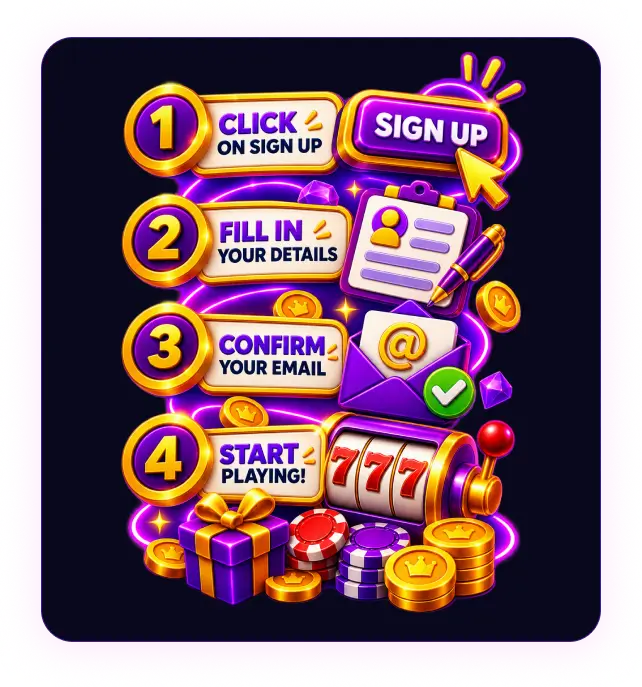
- Press Sign up in the top-right corner.
- Enter an email address and create a password.
- Select Canada as the country and CAD as the currency.
- Choose whether to receive personal offers and new promotions.
- Confirm that you are of eligible age and accept the Terms and Privacy Policy.
- Add first name, last name, phone number and date of birth.
- Enter province, city, street address and postal code.
- Press Save to complete the registration form.
We use the registration details for login, bonus use, payment checks and verification, so every field needs to match the player’s documents before the form is submitted.
Account Verification and KYC Requirements
The Charmius register process creates the player profile first. We then use KYC to confirm the player’s identity, age, address and payment ownership before withdrawals or during additional account checks. To complete this step, we request relevant documents. The review is completed within 24 hours when uploaded files are clear, readable and match the account details.
| Document type | Purpose | Accepted examples |
|---|---|---|
| Government-issued ID | Identity and age confirmation | Passport, driver’s licence, national ID |
| Proof of address | Residential address confirmation | Utility bill, bank statement, official document issued within the last 3 months |
| Payment method proof | Ownership of deposit or withdrawal method | Bank card, e-wallet confirmation, bank account statement |
| Extra compliance check | Source and activity review | Source of funds, source of wealth, video or phone verification |
Files need to be complete, unaltered and easy to read. Bank card copies show the cardholder name, expiry date and the first six and last four digits only. The CVV/CVC stays fully covered. False, unclear or incomplete documents delay the review and restrict withdrawals or some account functions. We store verification records in line with account security and legal record-retention rules.
Charmius Login and Account Access
The Charmius Casino login process returns players to the account area after logout, session expiry or device change. Players open the sign-in form, enter the email address saved during registration and add the password linked to the profile. After a successful login, players can access the account balance, promotions, payment options, game catalogue, verification status, and profile details from the main navigation.
Password recovery starts from the Forgot your password? link on the login form. We send the reset message to the registered email address, so players should check their inbox and spam folders before sending another request. After access is restored, account settings let players update contact details, review marketing preferences and change the password.
Account security at Charmius Casino depends on private login details and careful device use. Players need to log out after sessions on shared or public devices, avoid saving passwords on unsecured browsers and contact support after any suspicious access. Our support team checks account access before sensitive profile changes are approved.
Registering on Mobile Devices
Charmius Casino mobile registration follows the same account creation route used on desktop. Players open the site in a mobile browser or Progressive Web App (PWA), press Sign up and complete the registration form. We ask for the same required details on phones and tablets: email, password, Canada, CAD, personal information, address fields and confirmation of the Terms and Privacy Policy. The process does not change. Only the interface adapts to a smaller screen.
Smartphone and tablet navigation uses compact menus, readable fields and buttons sized for touch input. After pressing Save, the account features remain available from the profile area, including login access, verification status, Cashbox, promotions and support.
Ready to feel the magic?
Up to 2,000 CAD + 100 free spins across two deposits. Claim on your first two welcome deposits, starting from 30 CAD.
2,000 CAD + 100 FS
First Deposit After Registration
After players complete the Charmius Casino sign up process, they get access to Cashbox for funding the balance. To make the first deposit, open Deposit, choose a payment route, enter the amount, check provider details and confirm the transaction. The first deposit minimum is 30 CAD, and it needs to come from a payment method registered in the player’s own name. This helps match payment ownership with the profile details used for later checks.
Cashbox separates the deposit routes available for Canada and CAD by payment type. Card and Interac deposits redirect players to a provider window. Voucher payments require the correct code. Crypto payments require the correct wallet address and network details.
| Payment method | Minimum deposit | Processing time | Funding note |
|---|---|---|---|
| Interac | 30 CAD | Up to 24 hours | Canadian bank-based deposits |
| Visa / Mastercard | 30 CAD | Instant to 24 hours | Card payments in the player’s own name |
| Neosurf / Flexepin | 30 CAD | Up to 24 hours | Prepaid voucher funding |
| Crypto | 30 CAD | Up to 1 hour | Bitcoin, Ethereum, Solana and other supported coins |
After confirmation, approved funds appear in the real-money balance. Deposit bonuses and free spins follow the offer conditions in the promotions area, so the payment amount and selected reward need to match the active terms.
Bonuses Available for New Players
Our new-player bonus line-up becomes available after the account is created and the profile details are saved. The main value comes from the welcome package, with extra free spin rewards linked to email confirmation and mobile setup. These offers give new players several starting options before regular promotions and VIP rewards become relevant.
The new-player bonus options include:
- Welcome package: up to 2,000 CAD and 100 free spins across the first two deposits.
- First deposit offer: 100% match up to 1,000 CAD plus 100 free spins, with a 30 CAD minimum deposit.
- Second deposit offer: 200% match up to 1,000 CAD, with a 60 CAD minimum deposit.
- Email verification reward: 10 no-deposit free spins with a 0.20 CAD spin value, 40x wagering and a 75 CAD maximum win.
- PWA installation reward: 20 no-deposit free spins with a 0.10 CAD spin value, 40x wagering and a 75 CAD maximum win.
We separate new-player rewards by activation route. Deposit offers depend on the correct deposit sequence, CAD funding amount, and active promotion terms. Free spin rewards are triggered by account actions, such as confirming the registered email or completing mobile setup. These rewards come from deposit or profile actions, not promo code entry.
The main difference is activation timing. Welcome bonuses start from qualifying deposits, so the payment amount has to match the offer before the reward is credited. No-deposit free spins activate after account actions and carry their own spin value, wagering requirements and maximum-win rules. Players need to check wagering requirements, expiry dates, eligible games and maximum bet rules before using any reward, since bonus winnings become withdrawable only after the attached conditions are completed.
Promo Codes and Bonus Activation
Charmius Casino promo codes are short personal codes used to connect a private offer to a player profile. They are not required for standard public promotions on our site. Regular public promotions already include their own claim rules, so the offer page names the required action, such as a deposit, account confirmation or another campaign step.
We send personal promo codes by email or SMS when marketing consent is active on the account. Each code belongs to one specific offer and does not work as a general discount or universal bonus key. To use a personal code, enter it in the promo code field inside the profile area before claiming the reward.
Activation starts only after the code is accepted and the offer condition is completed. Deposit offers require the correct CAD amount before the reward is credited. Non-deposit offers follow the instruction sent with the code. Expired, mistyped, already used or unrelated codes do not add a reward. Active dates, wagering rules, eligible games and reward limits still apply.
No Deposit Bonus
Welcome bonuses, Wednesday Free Spins, Sunday Gift, email confirmation free spins and PWA free spin gifts carry 40x wagering. Bonuses also have a 7.50 CAD maximum bet limit.
FAQ
What does Charmius Casino registration require?
Registration requires accurate personal details, a valid email address, selecting Canada and CAD, agreeing to the terms, and opening one profile in the player’s own name.
When does Charmius Casino require verification?
We use KYC to confirm identity, age, address and payment ownership before withdrawals, during extra compliance checks or when account activity triggers a review.
Do players need to log in to Charmius Casino every time?
No. Login is needed after logout, session expiry, browser data clearing or device change. The registered email and password restore account access.
Does Charmius Casino mobile registration change the process?
No. The same registration fields and account rules apply on phones and tablets. Only the mobile browser layout adapts menus, buttons and forms to smaller screens.
Which bonuses does Charmius Casino offer after registration?
New accounts receive access to welcome deposit offers, email verification free spins and the PWA installation reward under the relevant wagering and expiry rules.
Where do Charmius Casino promo codes come from?
Personal promo codes come directly from us and are separate from standard public promotions. Players can receive them by email or SMS when marketing consent is active on the account.
How does Charmius Casino protect account access?
We protect account access with encrypted sessions, private login credentials and account checks before sensitive profile changes. Players also need to use secure devices, log out on shared devices and contact support after suspicious activity.
Can players change the registered email at Charmius Casino?
Yes. Players contact our support team through live chat or [email protected] to request a registered email change. Account checks are completed before the update is approved.
What if the Charmius Casino activation email does not arrive?
Check spam or promotions folders first. If the message is missing, our support team helps confirm the email address and resend account activation instructions through chat or email.
